
Getting Started
Widget Options
Inventory Display Options
Location Options
Online Availability Options
Geolocation Search
Incoming Inventory
Advanced Styling & Customization
Display inventory info for bundled products
Show available inventory for Shopify Bundles by enabling bundled product support in the Multi-location Inventory Info app.
The app calculates the available inventory per location for each bundled product. It uses the stock levels of individual components to determine how many complete bundles can be assembled, based on the lowest-stock item.
Note: You need bundled products created using the Shopify Bundles app.
Limitations
Keep in mind the following limits when using this feature:
- Supports bundled products with up to 20 variants
- Each bundled variant can include up to 50 components
- Inventory can be calculated for a maximum of 50 locations
How to access and enable inventory calculation
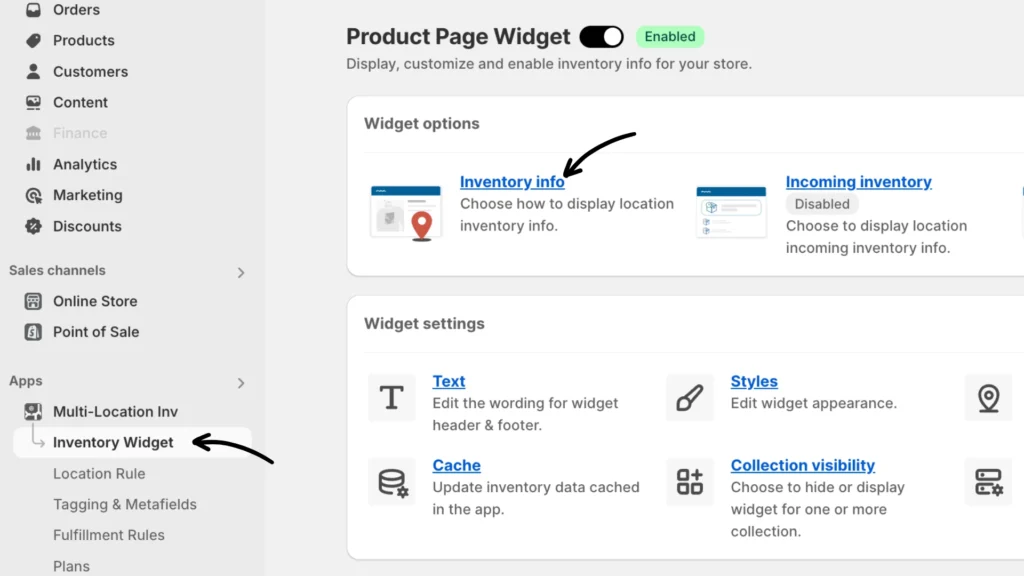
Step 1: From your Multi-location Inventory Info app, navigate to Inventory Widget > Inventory Info (under Widget options).
Step 2: Scroll to the bottom of the settings panel and check the box labeled Calculate inventory for bundled products under the “Display inventory info for bundled products” section.
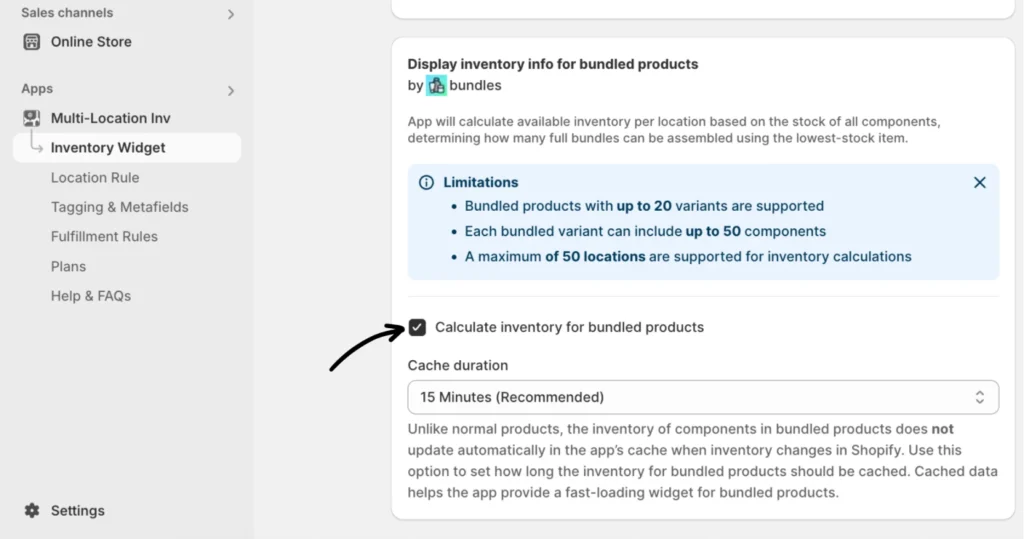
Step 3: Set the Cache duration from the dropdown menu. We recommend setting it to 15 minutes.
Note:
- Unlike standard products, bundled inventory doesn’t auto-refresh with each stock change in Shopify. Adjust this setting to control how often cached data is refreshed.
- Cached data ensures that the inventory widget loads quickly for your customers.