
Location stock quantity does not update after selecting a variant
This article discusses what you can do when the location stock quantity does not update upon selecting a variant.
For the majority of themes, the app should be able to detect when a variant selection has changed on product pages, this is done by monitoring the variant changes in the URL. In this sample URL, the variant queryString will change or be added when the user changes the variant on the product pages.
See the example below:
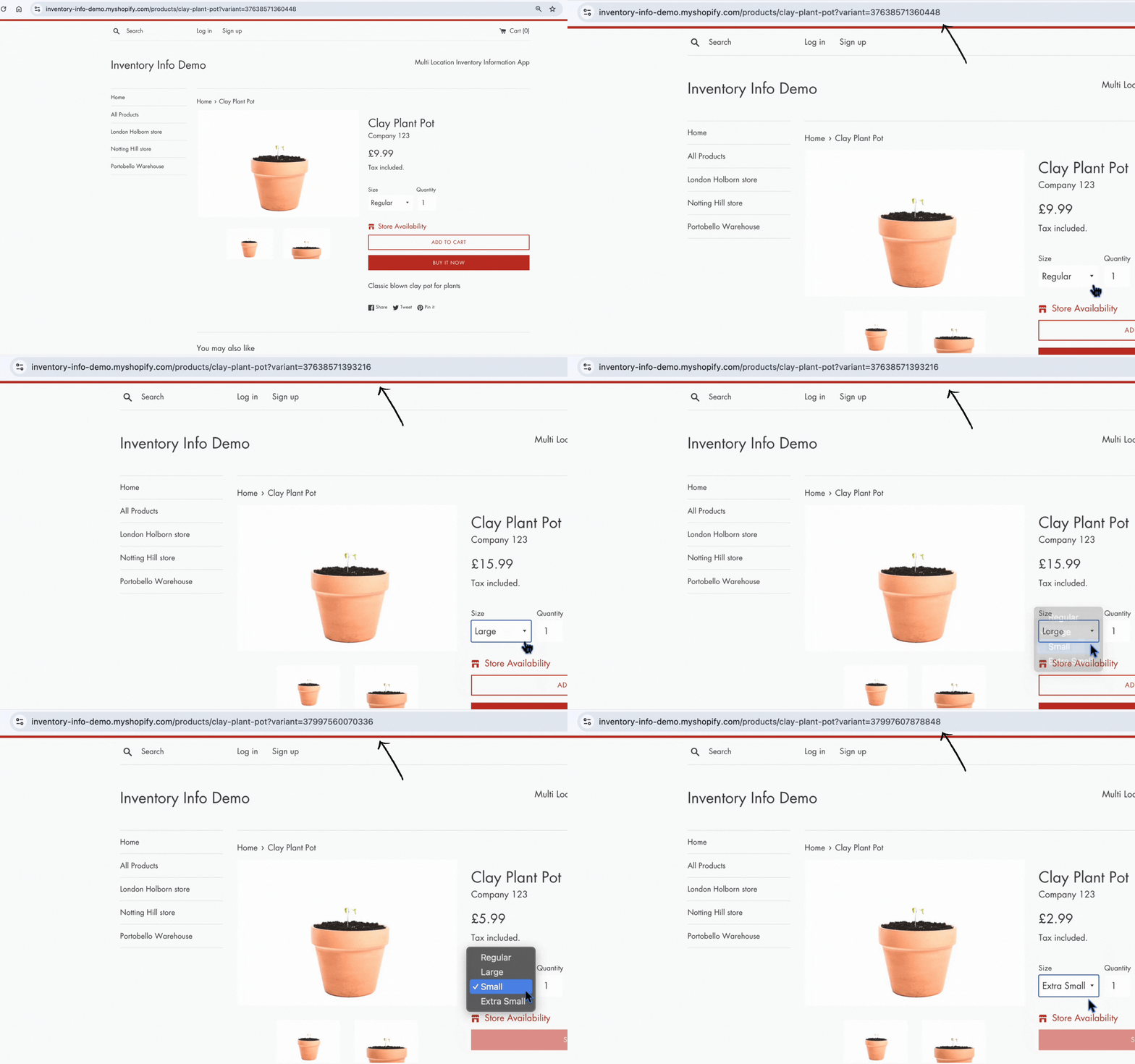
However, some themes don’t use URLs for variants or change the URL in a way that is not detected by the app. In that case, you have two options:
Option 1
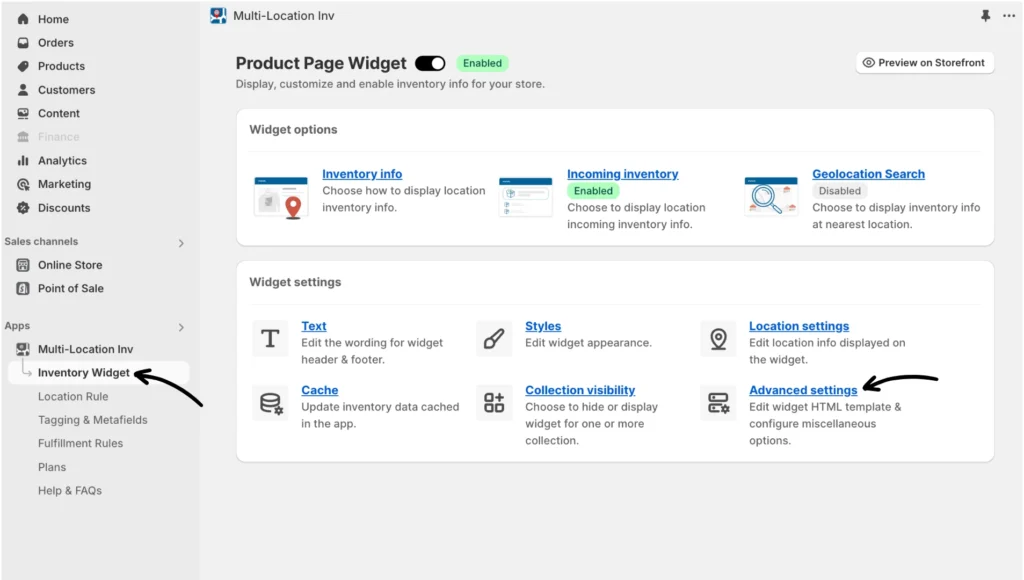
Use the “Theme does not use variant id in the URL when switching variants” option within the app. First, go to the app’s Inventory Widget and click Advanced settings.
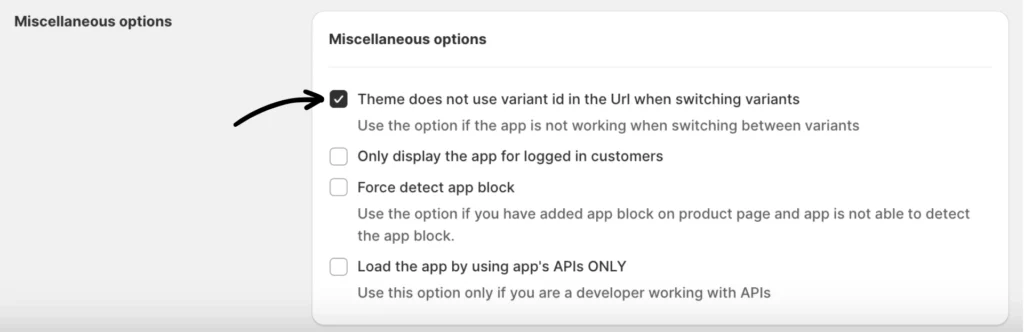
Then, scroll down to Miscellaneous options and tick the “Theme does not use variant ID in the URL when switching variants” box.
Option 2
Provide a custom variant selector (found above “Miscellaneous options”).
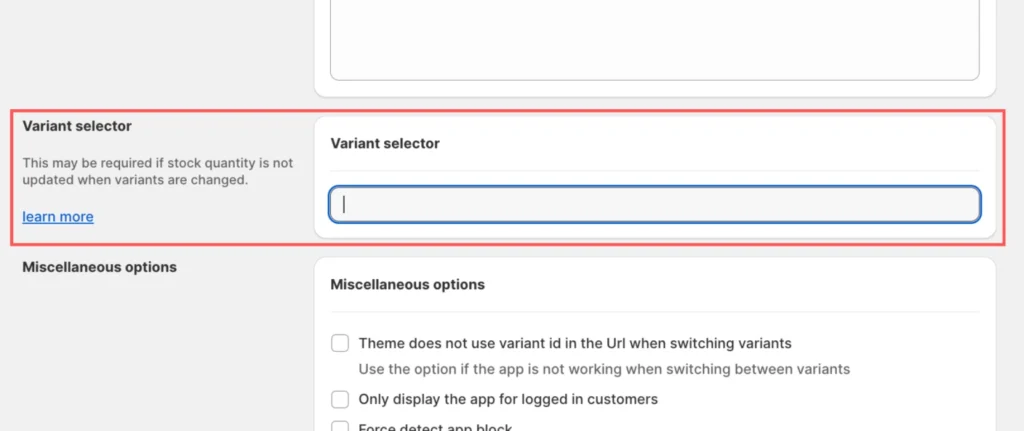
Note: This requires HTML/JavaScript knowledge
Custom code to change variants via the App’s APIs
Suppose none of the options worked because the theme has something entirely custom to display variant options. In that case, you must detect a change in the variant on your theme and then update the location stock quantity using the app’s JavaScript API.
Below is a code snippet sample:
(function() {

  const getHandleFromUrl = function() {

    const pathname = window.location.pathname;

    const index = pathname.lastIndexOf('/') + 1;

    return pathname.substr(index);

  };

  const customElement = document.querySelector('[SELECTOR_FOR_YOUR_ELEMENT]');

  // Typically event is change or click/touch

  customElement.addEventListener('[EVENT]', function() {

    const productHandle = getHandleFromUrl();

    const variantId = getVariant(); //THIS IS YOUR FUNCTION WHICH GIVES CURRENTLY SELECTED VARIANT ID

    // Below line is the API function exposed by the app which requires an object with

    // product handle and variant Id to display location stock quanity.

    window.inventoryInfo.api.loadApp({

      handle: productHandle,

      variant: variantId

    });

  });

})();
(function() {
const getHandleFromUrl = function() {
const pathname = window.location.pathname;
const index = pathname.lastIndexOf('/') + 1;
return pathname.substr(index);
};
const customElement = document.querySelector('[SELECTOR_FOR_YOUR_ELEMENT]');
// Typically event is change or click/touch
customElement.addEventListener('[EVENT]', function() {
const productHandle = getHandleFromUrl();
const variantId = getVariant(); //THIS IS YOUR FUNCTION WHICH GIVES CURRENTLY SELECTED VARIANT ID
// Below line is the API function exposed by the app which requires an object with
// product handle and variant Id to display location stock quanity.
window.inventoryInfo.api.loadApp({
handle: productHandle,
variant: variantId
});
});
})();If you need help with any of these, please feel free to contact our support team.